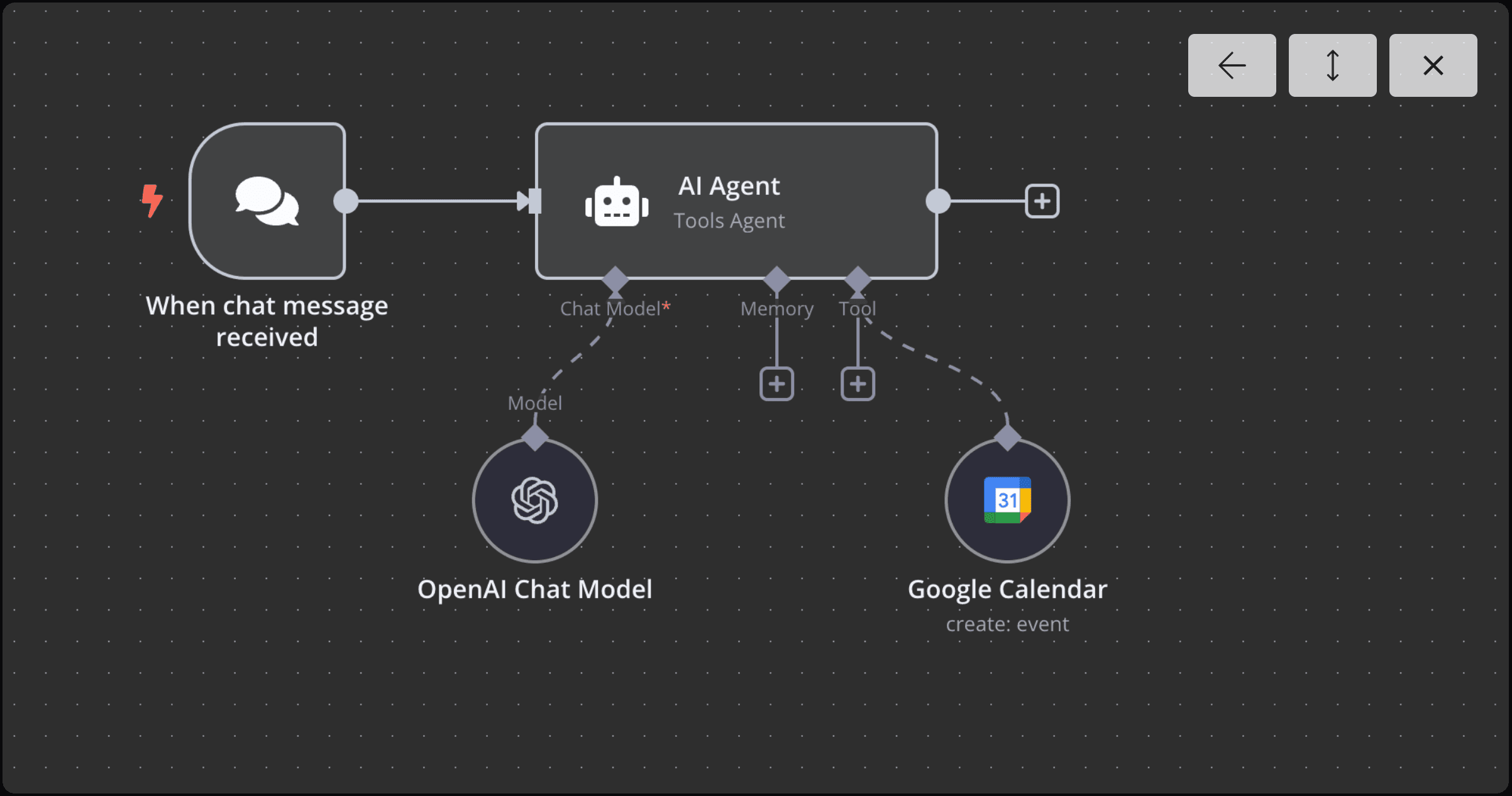
Management of scheduling is often a frictionless entry point into the world of AI automation. By integrating a Large Language Model (LLM) with a robust workflow engine, we can create a system that understands natural language intent and translates it into structured API calls.
This guide outlines the implementation of an AI scheduling assistant that operates entirely through text commands.
Technical Stack Overview
To build a production-ready workflow, we utilize the following components:
- n8n: An extendable workflow automation tool that serves as the orchestrator.
- OpenAI GPT-4: The reasoning engine responsible for intent parsing and entity extraction.
- Google Calendar API: The final destination for the structured event data.
Workflow Architecture
1. Initialization: The Chat Trigger
The workflow begins with a Chat Trigger node. This serves as the entry point where the user provides a natural language command such as "Schedule a sync with the engineering team for tomorrow at 2 PM IST."
2. The Reasoning Layer (AI Agent)
The central intelligence of the workflow is the AI Agent node. Unlike a standard LLM call, the agent is configured to use tools (functions) to interact with the environment.
3. Google Calendar Integration
The Google Calendar node is added as a tool for the AI Agent. This allows the LLM to autonomously decide when to call the createEvent method based on the user's input.
System Prompt Engineering
The reliability of the assistant depends heavily on the system prompt. We must define the agent's persona, its constraints, and provide it with the necessary temporal context.
You are a professional calendar assistant. Your primary objective is to manage scheduling requests accurately.

Guidelines:
1. Parse the user's request for event title, start time, and duration.
2. If the timezone is not specified, default to India Standard Time (IST).
3. Use the provided tools to check availability before confirming any event.
4. If a conflict occurs, suggest the next logical opening.

Context:
Today's date is: {{DateTime.now().setZone('Asia/Kolkata').toFormat('dd LLL yyyy HH:mm:ss')}}
The inclusion of the dynamic DateTime expression is critical. LLMs are "time-blind" by default; without this, the agent cannot accurately interpret relative dates like "tomorrow" or "next Friday."
Handling Dynamic Data
When the AI Agent parses a request, it must pass structured JSON data to the Google Calendar tool. Here is a representation of how the agent maps natural language to a structured schema:
{
	"summary": "Engineering Sync",
	"start": "2025-05-03T14:00:00Z",
	"end": "2025-05-03T15:00:00Z",
	"timezone": "Asia/Kolkata"
}
Debugging Common Failure Modes
During testing, you may encounter edge cases that require specific handling:
- Mathematical Drift: Sometimes the LLM incorrectly calculates the end time. We solve this by explicitly instructing the agent in the system prompt to calculate duration based on start time.
- Ambiguous Dates: If a user says "on Tuesday," the agent needs to know which Tuesday they mean.
Protocol: Always instruct the agent to ask for clarification if the input is ambiguous. It is better to have a clarifying interaction than an incorrect calendar entry.
Conclusion
By the end of this setup, you have transitioned from manual data entry to a system of autonomous execution. This workflow is a foundational example of how Agentic AI can handle real-world logistics with precision.